 TradeFlo
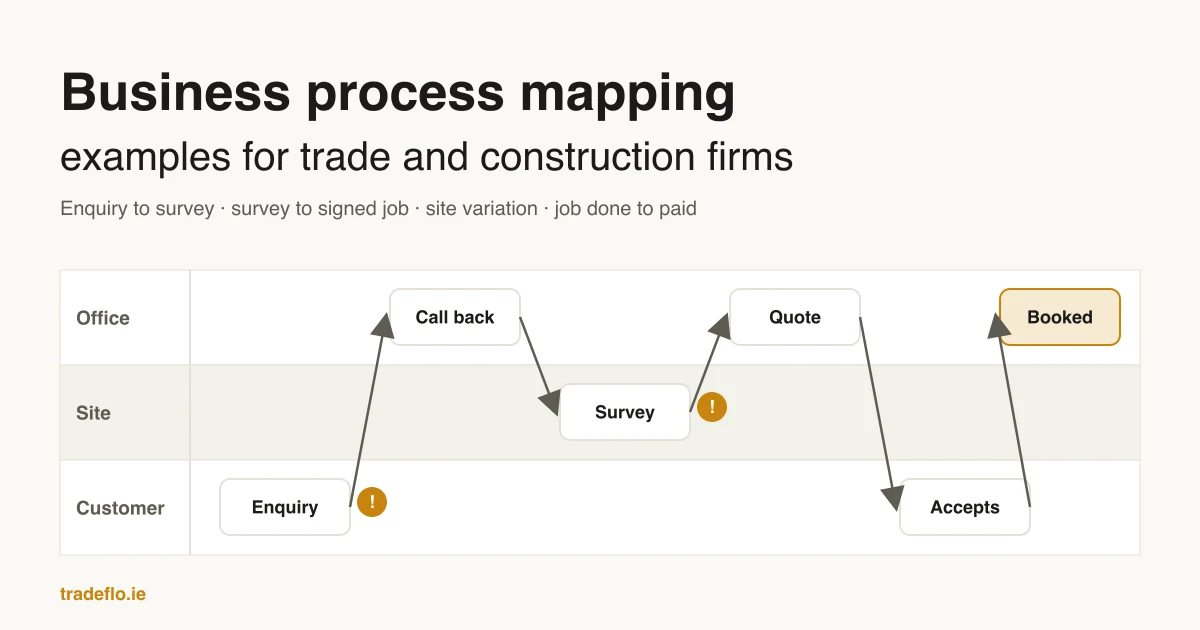
Most owners can tell you how a job should go, but fewer can tell you where a job actually sits on a Thursday afternoon, or why a quote that went out a fortnight ago never turned into work. A process map answers that. These business process mapping examples are written for trade and construction firms, so the steps are the ones your office already runs: the enquiry, the survey, the quote, the variation and the invoice.
None of this needs software. A sheet of paper and the person who does the work will get you most of the way. If you want us to do it with you, that is the Map step of how we run the office for a firm.
What a business process map is
A business process map is a drawing of how one piece of work moves through your business, from the thing that starts it to the thing that finishes it. It names each step, the person who owns it, and every handover between people. The American Society for Quality lists the uses plainly: to understand how a process is performed, to communicate it, to study it for improvement and to document it (ASQ, flowcharts).
For a trade firm, the useful part is the handovers. Work rarely stalls while someone is doing a step. It stalls between steps. For example, the survey notes sit in a van, or the quote waits for a supplier price nobody chased.
The three kinds of map worth knowing
| Map type | What it shows | Use it when |
|---|---|---|
| SIPOC outline | Suppliers, inputs, process, outputs and customers, on one page | You are starting out and want the edges of the process agreed before drawing steps |
| Flowchart | Each step in order, with yes/no decisions | One person runs most of the process and you want the order written down |
| Swimlane map | The same steps, split into a row per person or role | Work passes between people (office, site, supplier, customer) and you want to see each handover |
A SIPOC diagram is a one-page outline of a process. ASQ describes it as a high-level view of the process "as is", best drawn before a flowchart, when a team first needs to agree what the process includes (ASQ, SIPOC). For most trade firms the swimlane map is the one to draw, because nearly every job crosses from the office to the site and back. The University of Notre Dame's business analysis guide calls it a cross-functional or deployment flowchart, and notes that it is useful for spotting delays, duplicated work and points where a process can fail (University of Notre Dame, swimlane diagram).
BPMN (Business Process Model and Notation) is the formal standard, kept by the Object Management Group, with its own symbols for events, gateways and tasks (OMG, BPMN). It is useful if software will run the process later. For a first map of your own office, boxes and arrows are enough.
Example 1: from enquiry to booked survey
The first process map example is made up for this post. A homeowner fills in the form on a heating firm's website at 9pm asking about a new boiler. Here is the path, with the owner of each step.
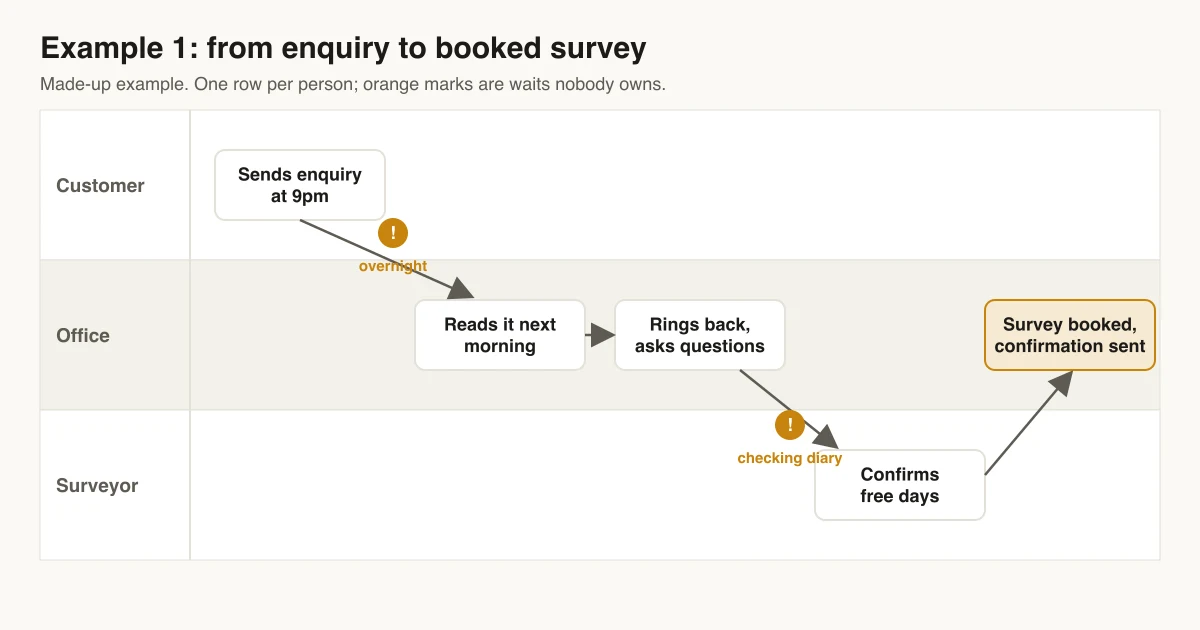
- 01Customer sends the enquiry (form, call or WhatsApp). Owner: customer.
- 02Office reads it the next morning. Wait: overnight, plus however long the inbox sits.
- 03Office rings back, asks the job questions and checks the area. Owner: office.
- 04Office offers survey slots from the diary. Wait: until the surveyor confirms which days are free.
- 05Survey booked and the customer gets a confirmation. Owner: office.
- 06Surveyor visits and takes photos and measurements. Owner: surveyor.
The map shows two waits that nobody owns: the overnight gap before anyone reads the enquiry, and the gap while the office checks the surveyor's days. Both are fixable without a new hire. A shared diary removes the second one. A first reply that goes out the same evening covers the first, which is what enquiry handling is for.
Example 2: from survey to signed job
Made-up example. A roofing firm has surveyed a job and now has to price it.
- 01Surveyor hands over notes, photos and measurements. Wait: until the notes leave the van.
- 02Estimator asks a supplier for a materials price. Wait: until the supplier replies.
- 03Estimator builds the quote and the owner checks the margin. Owner: owner.
- 04Office sends the quote to the customer.
- 05Office follows up if there is no answer. Wait: often forever, because no step says when.
- 06Customer accepts, pays a deposit if you take one, and the job goes into the diary.
A common weak point in quote maps is step five. A follow-up that depends on someone remembering is a step with no owner. Writing "office rings on day 3, emails on day 7" on the map turns it into a step someone can do. The supplier price in step two is the other usual wait, and it is the one our supplier quotes work looks at.
Example 3: a variation on a construction job
Made-up example. On a house extension, the client asks the site foreman to move a doorway. This is the map construction firms most often get wrong, because the work happens before the paperwork.
| Step | Who | What happens | Where it can wait |
|---|---|---|---|
| 1 | Client and foreman | Client asks for the change on site | No written record yet |
| 2 | Foreman | Notes the change, takes photos, tells the office | Until the foreman gets back to the office |
| 3 | Office or QS | Prices the change: labour, materials, time | Until a supplier price comes back |
| 4 | Office | Sends the variation to the client for approval | Until the client replies |
| 5 | Client | Approves in writing | Work may already be done by now |
| 6 | Office | Adds the approved variation to the next invoice | Until someone matches it to the invoice run |
Drawn out like this, the risk is plain: the doorway moves at step one and the approval arrives at step five, if at all. The fix most firms land on is a rule on the map itself: no change starts until step four has gone out, even as a text with a photo. Our page on variations covers how we set that up.
Example 4: from job done to paid
Made-up example. An electrical firm finishes a rewire.
- 01Electrician marks the job done and uploads the certificate and photos.
- 02Office checks the job sheet against the quote and any approved variations.
- 03Office sends the invoice with a link to pay.
- 04Office checks for payment and sends a reminder if it has not arrived by the due date.
- 05Payment lands and the office marks the job paid.
- 06Office asks the customer for a review.
The common gap here is between steps one and three. If the invoice waits for the end of the month, the whole job waits with it. Putting "invoice goes out the day the job is marked done" on the map is a small change that the map makes obvious.
How to map your own process in an afternoon
- 01Pick one process that costs you money when it stalls. Quote to signed job is a good first choice.
- 02Get a recent real job file for it, with private details removed. Work from what happened, not from how it should go.
- 03Sit down with the people who handle each handover. The office lead and one person from site is usually enough.
- 04Write each step on its own line or sticky note, with the person who owns it.
- 05Mark every point where the job waits, and how it gets moving again.
- 06Draw it as a swimlane: one row per person, steps in order left to right, and an arrow at each handover. The Minnesota Department of Health's guide puts it simply: a swim lane map has three elements, time, people and tasks (MDH, swim lane map).
- 07Ask the people who do the work whether the map matches what happens. Fix it until they say yes.
Start with how the work really runs on a normal week, not the best week. A map of the ideal process hides the waits you are trying to find.
What to do with the map once you have it
Look at the waits first, because a wait with no owner is the cheapest fix in the whole business: give it an owner and a time, and it usually shrinks. Then look at the steps that are pure copying. For example, retyping survey notes into a quote, or matching variations to an invoice by hand. Those are the steps worth handing to software, and only once the map shows they are stable.
That order matters. Automating a process nobody has mapped tends to make a messy process run faster. It is why the Map step comes before any connection or build in how we run the office, and why the map is checked by your office lead before anything else is scoped.
Want a map of one of your workflows?
We follow one workflow with the people who handle it and hand your office lead a written map of every handover, waiting point and owner. No AI runs at this step.
See how the Map step worksQuestions people ask
What is business process mapping?
Business process mapping is drawing how one piece of work moves through your business: each step, who owns it, and each handover between people. For a trade or construction firm that usually means the path from enquiry to payment, or a sub-process like a site variation.
What is the difference between a flowchart and a swimlane map?
A flowchart shows the steps in order. A swimlane map shows the same steps split into a row for each person or role, so you can see every handover between the office, the site, suppliers and the customer. For firms where work passes between people, the swimlane is the more useful of the two.
Do I need software to map a business process?
No. Paper, a whiteboard or sticky notes are enough for a first map. Diagram tools help when you want to share or update it, and the formal BPMN notation helps if software will run the process later. The hard part is walking a real job with the people who did it.
Which process should a trade firm map first?
The one that costs the most when it stalls. For most firms that is quote to signed job or job done to paid, because a wait in either one delays money you have already earned or nearly earned.
What is a SIPOC diagram?
A SIPOC diagram lists the suppliers, inputs, process, outputs and customers of a process on one page. ASQ recommends it as a high-level view before you draw a detailed flowchart, so everyone agrees where the process starts and ends.
Sources
Written by
TradeFlo
Written by the TradeFlo team, checked against the sources listed
Fact-checked against the sources listed above before publishing. More about us. Spotted something wrong? Contact us and we will correct it.